
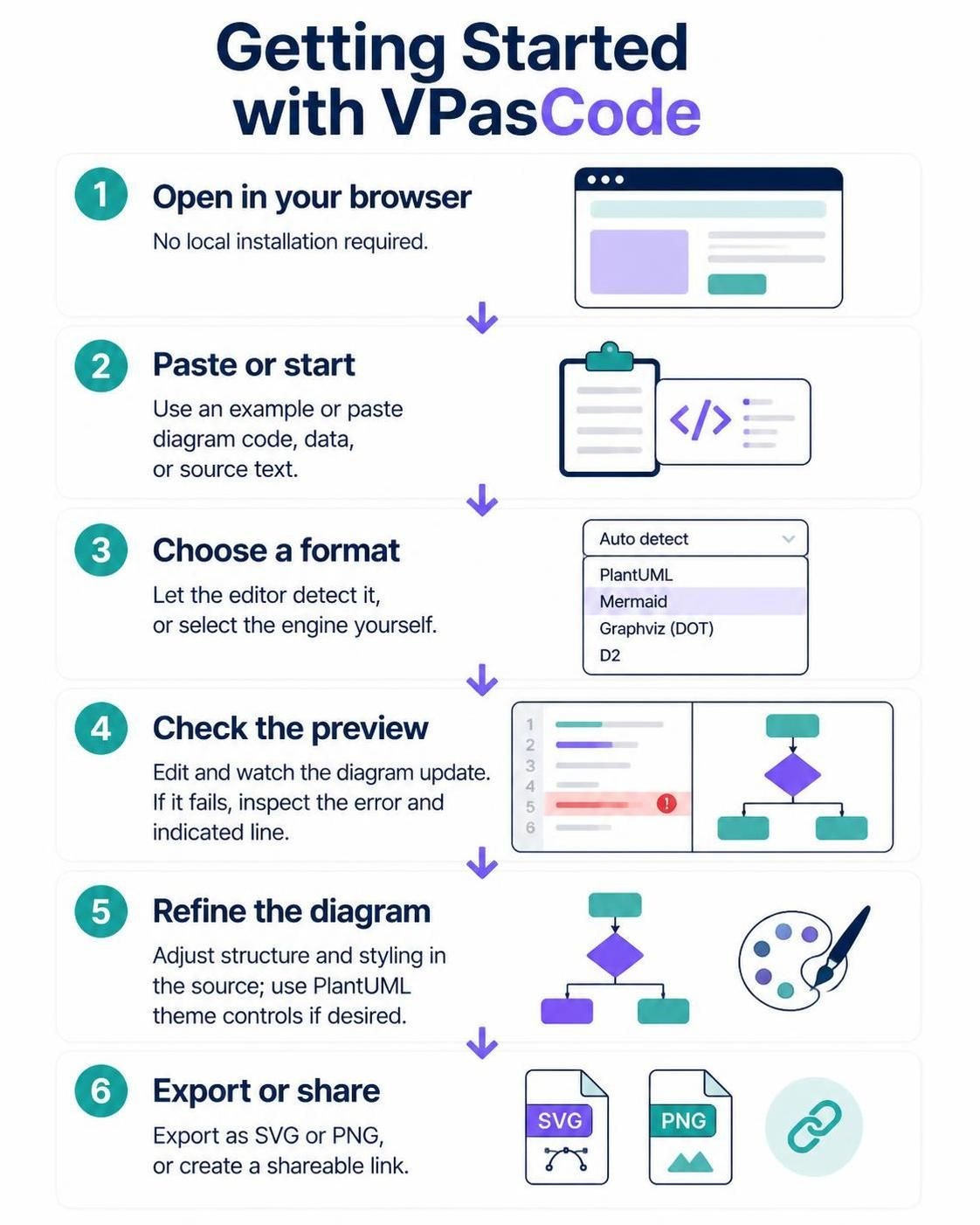
In the rapidly evolving landscape of software architecture and technical documentation, the ability to visualize complex systems is paramount. VPasCode, the coding-centric tool from Visual Paradigm, bridges the gap between traditional drag-and-drop interfaces and the precision of text-based coding. This tutorial explores the system architecture of VPasCode, demonstrating how it empowers users to design, edit, and export diagrams entirely within a browser environment without the overhead of local installation.
1. The Browser-Native Architecture
The foundational advantage of VPasCode lies in its architecture: it is a cloud-native, browser-based tool. Unlike traditional modeling software that requires heavy local installations and licensing management, VPasCode leverages modern web technologies to run directly in your browser. This “Zero-Install” approach ensures that developers and architects can start modeling immediately, regardless of their operating system or hardware limitations.
When you open the editor, you are essentially interacting with a lightweight client that communicates with a rendering engine. This architecture supports a variety of diagramming languages, making it a versatile tool for different modeling needs.
2. Input: Code, Data, and Source Text
Once the editor is loaded, the workflow begins with the input phase. The system is designed to be flexible, accommodating three primary modes of entry:
- Starting from Scratch: Begin with a blank canvas or a supported example template.
- Pasting Existing Code: Quickly import diagram code, data definitions, or source text snippets from other environments.
- Text-to-Diagram: The editor can often parse raw text descriptions and convert them into structured visual representations.
3. Engine Selection and Auto-Detection
One of the most powerful features of VPasCode is its intelligent engine selection. The system supports multiple diagramming backends, including PlantUML, Mermaid, Graphviz (DOT), and D2.
The editor attempts to auto-detect the format based on the syntax of the pasted code. This reduces the cognitive load on the user. However, for complex or ambiguous inputs, the workspace allows you to manually select the appropriate engine from a dropdown menu to ensure accurate rendering.
Supported Engines
The system architecture is robust enough to handle the specific syntax rules of various languages:
- PlantUML: Ideal for UML diagrams, sequence diagrams, and architecture flows.
- Mermaid: Excellent for flowcharts and sequence diagrams with a clean, modern syntax.
- Graphviz (DOT): Perfect for strict hierarchical graphs and network structures.
- D2: A modern declarative language for diagrams that offers high readability.
4. The Preview Loop and Debugging
The core of the VPasCode workflow is the Live Preview mechanism. As you edit the source text on the left, the diagram renders in real-time on the right. This immediate feedback loop is crucial for iterative design.
If the diagram fails to render, the system provides detailed error handling. The editor highlights the specific line in the source code that caused the failure and displays a corresponding error message. This feature transforms the debugging process from a guessing game into a precise, line-by-line inspection.
Example: Debugging a Syntax Error
Consider a scenario where a PlantUML diagram fails due to a missing keyword. The preview will likely show an error indicator, and the code editor will highlight the problematic line:
@startuml
skinparam monochrome true
actor User
rectangle "System" {
  User --> "Process"
  !
}
@enduml
5. Refining Structure and Styling
Once the diagram is structurally sound, the focus shifts to aesthetics. VPasCode allows for deep customization of the diagram’s appearance directly through the source code. For PlantUML specifically, users can leverage extensive theme controls to modify colors, borders, and skin parameters.
Refining the structure involves adjusting the logical relationships between elements. You can rearrange nodes, modify connector types, and define sub-systems without the frustration of manually dragging and dropping boxes on a canvas.
6. Export and Sharing
The final stage of the workflow is delivering the result. VPasCode supports multiple export formats to suit different distribution needs:
- SVG (Scalable Vector Graphics): Perfect for high-resolution documentation and web embedding.
- PNG: Ideal for presentations and standard image sharing.
- Shareable Links: Create a direct URL to the diagram for collaborative review or embedding in project management tools.