
ArchiMate is a standard modeling language for describing enterprise architecture and the relationships between business, application, and technology domains. TOGAF provides a method for developing and governing architecture; ArchiMate provides a consistent visual language for expressing it. They complement one another, but they are not interchangeable: ArchiMate does not prescribe a development process, and TOGAF does not require ArchiMate.
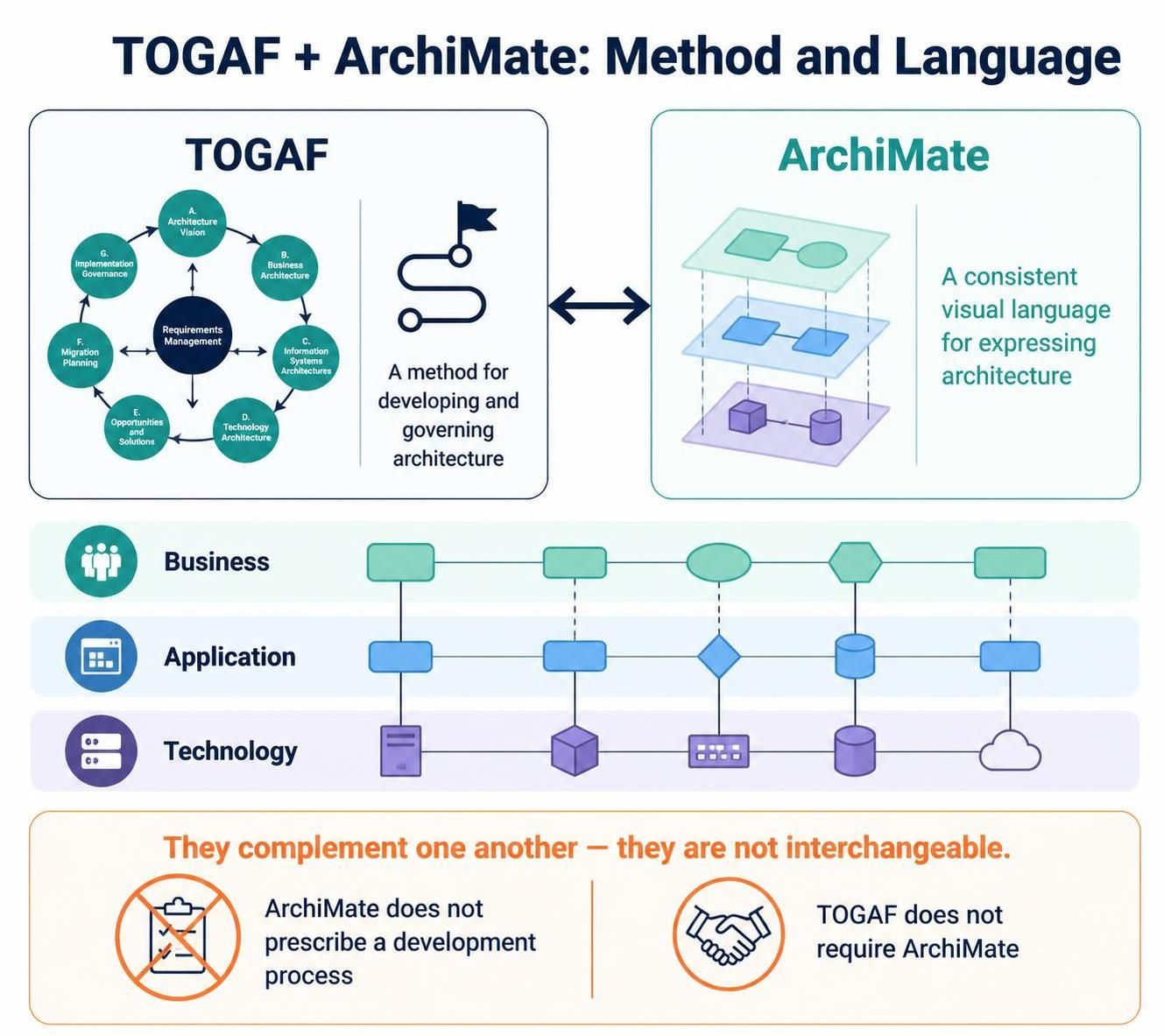
This guide focuses on using Visual Paradigm’s ArchiMate and TOGAF features together. Exact menus and availability can vary by Visual Paradigm product, edition, and version, so treat the workflow as a practical pattern rather than a guarantee of a particular screen layout.
1. Understand the modeling framework
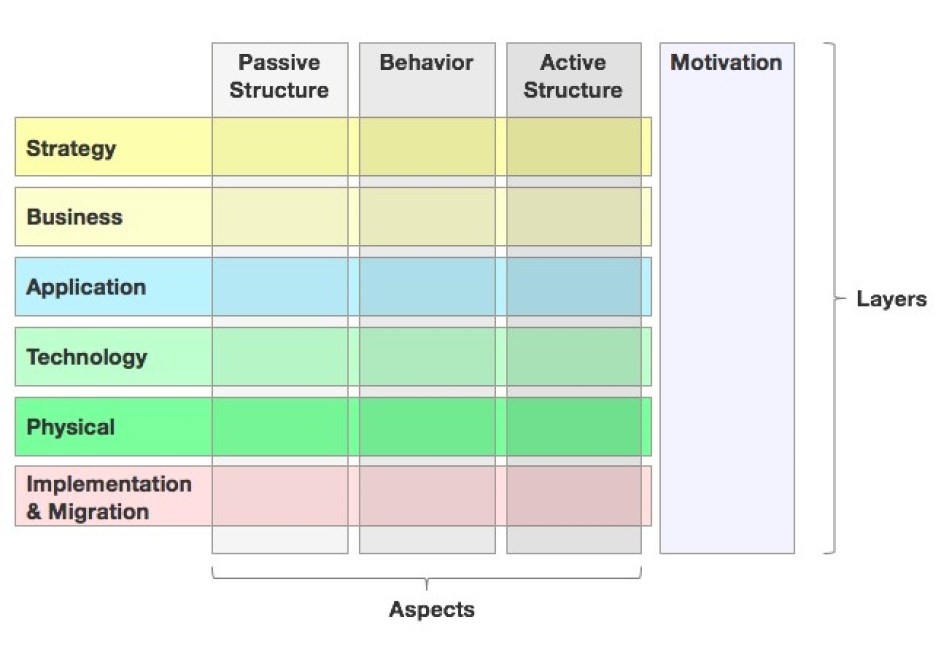
ArchiMate organizes architecture concepts into domains and layers. The core layers are:
-
Business: the organization’s actors, roles, processes, functions, services, and products.
-
Application: the software components and application services that support business behavior.
-
Technology: the infrastructure and technology services that support applications.
-
Motivation: stakeholders, drivers, goals, principles, and requirements that explain why architecture decisions are made.
-
Strategy: capabilities, resources, and courses of action that express strategic direction.
-
Implementation and Migration: work packages, deliverables, plateaus, and gaps used to plan the move from current to target architecture.
The business, application, and technology layers are often modeled as a connected stack: business services are realized by business behavior, application services support that behavior, and technology services support the applications. The motivation and implementation/migration extensions help connect the architecture to its rationale and its delivery plan.
A useful distinction when modeling software is whether it provides a business-facing application capability or is infrastructure software that supports other software. For example, a customer portal may be an Application Component, while a database-management system may be System Software in the Technology layer.
2. Establish the modeling purpose before drawing
Start with the decision or concern the model needs to support. Examples include:
-
Which applications support a business capability?
-
What changes are needed to introduce a new customer service?
-
Which technology components will be affected by replacing an application?
-
What gaps separate the current state from a target state?
Then identify the intended audience. Executives usually need a concise capability, outcome, or roadmap view. Solution architects may need application services, interfaces, data objects, and technology dependencies. Operations teams may need infrastructure and deployment detail.
Avoid trying to put every architecture fact in one diagram. Create separate views for different concerns, while keeping them based on the same underlying model elements wherever possible.
3. Build a small, connected model
For a typical initiative, begin with a compact set of elements:
-
Motivation: a driver, stakeholder, goal, and relevant requirement.
-
Business: the capability, business service, process, and responsible actor or role.
-
Application: the application component and the application service it provides.
-
Technology: the technology service and infrastructure or system software that supports the application.
-
Implementation: the work package or project that delivers the change, plus the current and target states and any key gap.
Connect the elements to express meaningful relationships. For example, a business process may use an application service; an application component may realize that service; and technology services may serve the application component. A project or work package can be associated with the change that closes a gap between current and target architecture.
Use relationships only when they communicate a real architectural connection. A diagram with many lines but no clear story is harder to review than a smaller model with explicit intent.
4. Use Visual Paradigm to manage the model
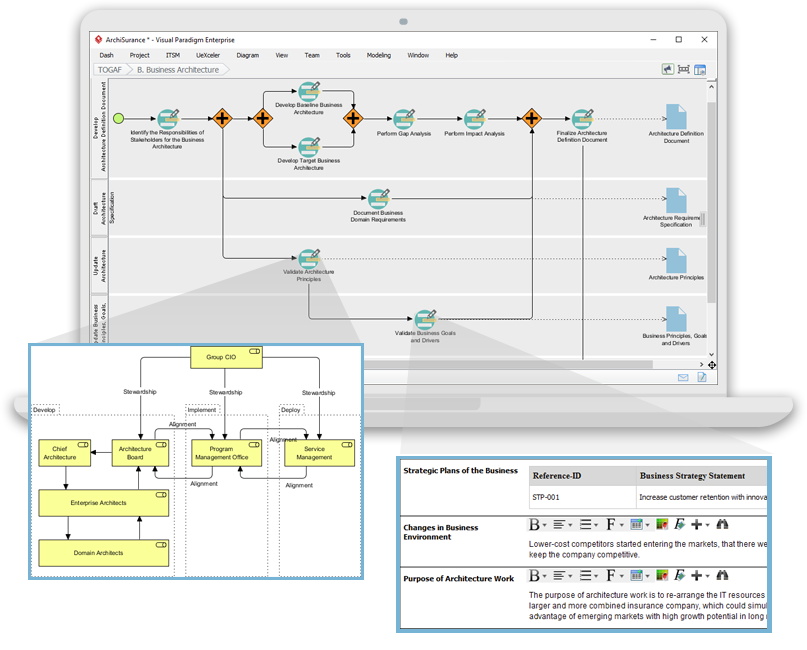
Visual Paradigm’s ArchiMate tools are intended for creating ArchiMate diagrams and viewpoints, while its TOGAF Guide-Through Process provides a structured way to work through ADM activities. Its documentation describes process navigation, progress tracking, guidance and samples, carrying deliverables between steps, and generating deliverables as phases are completed.
A practical setup sequence is:
-
Create an architecture project. Set the project scope, naming conventions, and repository or file structure.
-
Open the TOGAF ADM Guide-Through Process. Use it to organize work by phase and activity rather than treating the model as an isolated drawing.
-
Create shared model elements. Reuse the same business, application, and technology elements across diagrams instead of recreating them as lookalike shapes.
-
Create views for specific stakeholders. Use ArchiMate viewpoints to limit each diagram to the elements and relationships relevant to its audience.
-
Add documentation and ownership. Record definitions, assumptions, source, owner, status, and relevant decisions for important elements.
-
Review and validate the model. Check the language usage, relationships, labels, and traceability before publishing.
-
Generate and maintain deliverables. Use the Guide-Through process to organize phase outputs, then review generated material for accuracy and suitability.
Visual Paradigm describes support for ArchiMate modeling, viewpoints, TOGAF ADM guidance, progress tracking, and deliverable generation. Generated outputs should still be reviewed: automation can assemble material, but it cannot determine whether the model reflects the organization’s actual context or decisions.
5. Use ArchiMate with the TOGAF ADM
The ADM gives the work its lifecycle; ArchiMate diagrams help express architecture content within that lifecycle. Treat the following as a mapping guide—not a requirement to create a diagram for every activity.
| TOGAF ADM phase | Modeling focus | Useful ArchiMate content |
|---|---|---|
| Preliminary | Set up architecture capability, principles, scope, and governance | Principles, stakeholders, existing architecture concepts |
| A: Architecture Vision | Define the change, stakeholders, outcomes, and high-level scope | Stakeholders, drivers, goals, requirements, high-level business and solution views |
| B: Business Architecture | Describe baseline and target business architecture | Capabilities, actors, roles, processes, services, products |
| C: Information Systems Architectures | Describe data and application architecture | Application components, application services, data objects, business-to-application relationships |
| D: Technology Architecture | Describe the technology that supports the solution | Technology services, nodes/devices, system software, networks, artifacts |
| E: Opportunities and Solutions | Group changes into solution options and work packages | Work packages, deliverables, gaps, dependencies |
| F: Migration Planning | Sequence transitions from baseline to target | Plateaus, gaps, work packages, implementation events |
| G: Implementation Governance | Check delivery against the architecture | Requirements, constraints, affected elements, compliance decisions |
| H: Architecture Change Management | Manage changes to the architecture over time | Changed elements, new requirements, impacts, updated views |
| Requirements Management | Maintain architecture requirements across the cycle | Requirements linked to goals, services, components, and work |
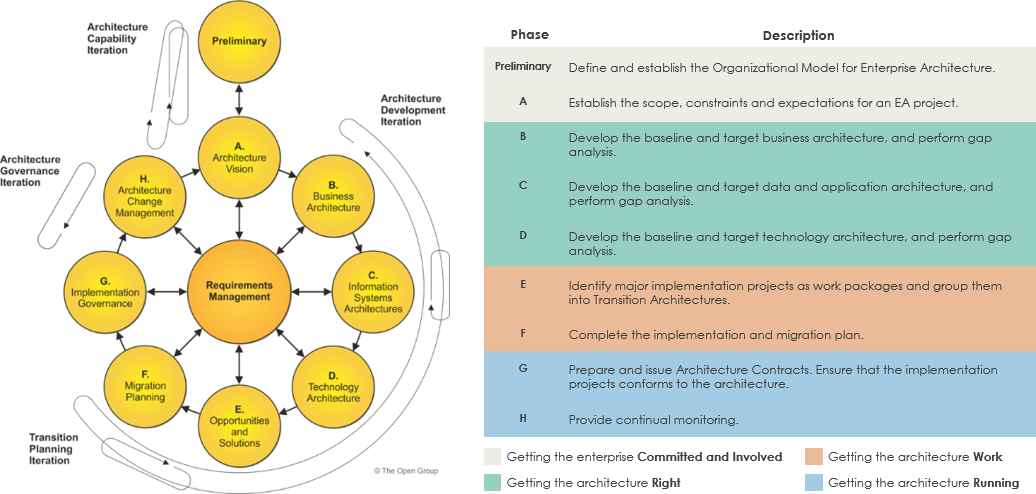
ArchiMate is especially useful for making relationships between layers explicit and presenting architecture through stakeholder-oriented views. Its concepts can be used to create integrated models that are then presented as TOGAF views.
6. Create effective views
A viewpoint defines what a particular view is intended to show. Before drawing, write down the question the view answers and the audience it serves. For example:
-
Capability view: Which organizational capabilities are in scope, and where are the gaps?
-
Business-process-to-application view: Which applications support each process?
-
Application cooperation view: Which application components exchange services or information?
-
Technology view: What infrastructure supports the applications?
-
Migration view: What work closes the gaps between the current and target states?
Keep views readable. Use meaningful names, avoid unnecessary detail, and distinguish current and target states consistently. If the diagram becomes difficult to read at normal viewing size, split it into a higher-level view and one or more supporting views.
7. Trace requirements through the architecture
A useful EA model explains why a change exists and what it affects. Maintain traceability from:
Driver → Goal → Requirement → Business capability or service → Application and technology changes → Work package → Target state
For example, a goal to improve order visibility might lead to a requirement for near-real-time status updates. That requirement could affect a business process, an application service, the application components that provide it, and the technology services needed to run them. A migration work package can then be associated with the affected elements and the transition to the target state.
Traceability makes impact analysis and review more useful, but only if relationships are maintained as the architecture changes.
8. Model current state, target state, and transition
For transformation work, distinguish three things:
-
Baseline: what exists now.
-
Target: the intended future architecture.
-
Transition: the intermediate states and work needed to get there.
Identify gaps explicitly rather than assuming that the target will simply replace the baseline. Connect each significant gap to a proposed work package or decision, and indicate dependencies where one change must precede another. Visual Paradigm’s TOGAF-related toolset is described as supporting gap analysis and migration planning artifacts alongside its ADM process.
9. Apply quality checks
Before sharing a model, review it for:
-
Purpose: Does each diagram answer a defined question?
-
Scope: Are boundaries, exclusions, and assumptions clear?
-
Consistency: Are shared elements reused and named consistently?
-
Semantics: Do the element types and relationships represent what you intend?
-
Traceability: Can important requirements and goals be followed to the architecture and planned changes?
-
State clarity: Can readers distinguish baseline, target, and transition?
-
Audience fit: Is the diagram understandable to its intended readers?
-
Maintenance: Is there an owner and a process for updating it?
A modeling tool can help maintain shared elements and produce organized diagrams, but it cannot substitute for architectural review and stakeholder agreement. The value of the model depends on the accuracy and usefulness of its content.
10. Common pitfalls
-
Treating ArchiMate as a method: Use the TOGAF ADM or another chosen method to guide the work; use ArchiMate to model and communicate architecture.
-
Drawing before agreeing on scope: Establish the decision, audience, and boundaries first.
-
Making one giant diagram: Use multiple views over a connected model.
-
Over-modeling infrastructure: Include technical detail only when it supports a decision or an operational need.
-
Using vague relationships: Make each connection explain a dependency, realization, serving relationship, or other meaningful link.
-
Treating generated deliverables as final: Review content, assumptions, and consistency before sharing.
-
Ignoring maintenance: Assign ownership and update the architecture when key systems, processes, or decisions change.
A strong working pattern is to use TOGAF ADM for the process, ArchiMate for the architecture language, and Visual Paradigm’s repository and Guide-Through features to organize the model and its deliverables. Keep the model focused on decisions, connect business intent to implementation, and create views that make those connections understandable to the people who need them.