
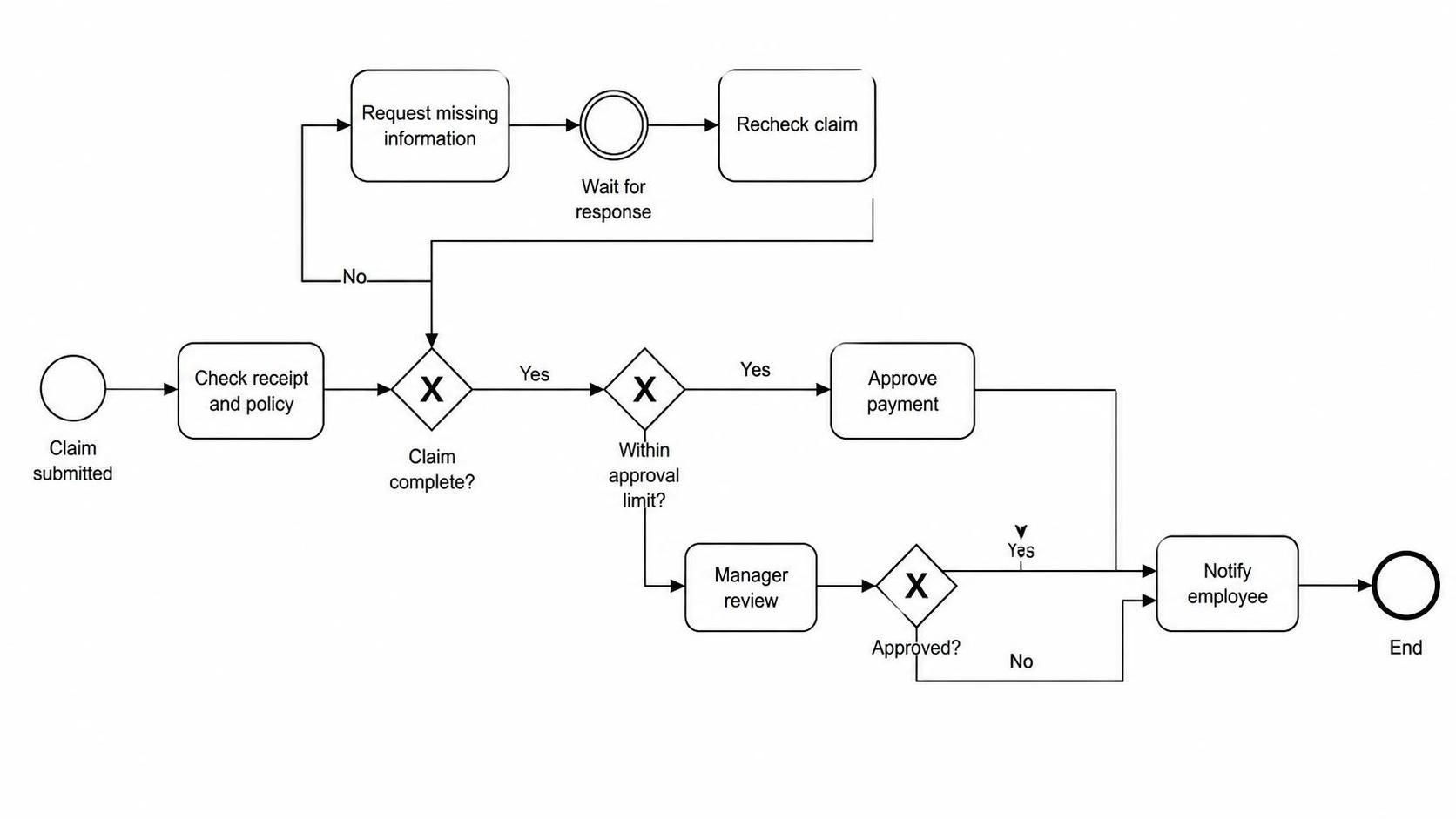
In the realm of business process management, clarity is currency. A well-structured diagram does more than just show a path; it tells a story of logic, exception handling, and decision-making. The diagram presented here illustrates a classic Expense Reimbursement workflow. It is a robust example of how to model a process that must handle both routine transactions and complex exceptions without losing the thread of the narrative.
This tutorial will deconstruct this specific BPMN (Business Process Model and Notation) diagram. We will analyze the flow from the initial claim submission to the final notification, exploring how loops, gateways, and event-based waits are utilized to create a resilient system architecture.
1. The Starting Point: Initiating the Workflow
Every process needs a trigger. In this model, the process begins with a Start Event, represented by the thin circle on the far left. The label Claim submitted indicates that the trigger is the receipt of a reimbursement request from an employee.
Immediately following the start event is the first task: Check receipt and policy. This is a critical validation step. Before any money moves, the system (or the administrator) must ensure that the documentation is present and that the expense complies with company policy. This sets the stage for the first major decision point.
2. The First Gateway: Handling Incomplete Data
The flow leads into the first Exclusive Gateway (the diamond with the ‘X’), labeled Claim complete?. This is a decision node that splits the process into two distinct paths based on a binary condition.
- The ‘No’ Path (Exception Handling): If the claim is incomplete, the flow moves to the task Request missing information. This is followed by a Intermediate Catch Event (the double circle) labeled Wait for response. This is a crucial modeling element. It signifies that the process is now in a “paused” state, waiting for an external actor (the employee) to provide the missing data. Once the response is received, the flow loops back to Recheck claim and re-enters the validation loop.
- The ‘Yes’ Path (Routine Flow): If the claim is complete, the process proceeds to the next stage of validation.
3. The Second Gateway: Financial Authority Limits
The next decision point is another Exclusive Gateway, labeled Within approval limit?. This introduces the concept of hierarchical approval based on financial thresholds.
- Low Value Claims: If the amount is within the standard limit, the path goes straight to Approve payment. This represents an automated or low-friction approval process.
- High Value Claims: If the amount exceeds the limit, the flow diverts to Manager review. This task represents a manual intervention where a higher authority must evaluate the expense.
4. The Third Gateway: Final Decision Logic
Following the Manager review, the process encounters a third Exclusive Gateway labeled Approved?. This handles the outcome of the manager’s review.
- Rejected: If the manager rejects the claim (the ‘No’ path), the flow bypasses the payment step and moves directly to Notify employee. This ensures the employee is informed of the rejection.
- Approved: If the manager approves the claim (the ‘Yes’ path), the flow merges with the direct approval path.
5. Convergence and Termination
Regardless of whether the claim was approved automatically, approved by a manager, or rejected by a manager, all paths converge at the task Notify employee. This demonstrates a best practice in process modeling: convergence. By merging paths at this point, the model ensures that the final step (notification) is consistent for all outcomes.
Finally, the process terminates at the End Event (the thick circle), marking the successful completion of the workflow.
Technical Implementation: Visual Paradigm BPMN
This diagram was created using Visual Paradigm, a powerful tool for modeling business processes. The specific use of the Intermediate Catch Event (the double circle) to represent “Wait for response” is a key feature of BPMN 2.0. It allows for a clear distinction between a task that takes time (like “Check receipt”) and a task that is waiting for an external signal (like “Wait for response”).
When modeling this in a tool like Visual Paradigm, you would typically drag and drop the following elements:
- Start Event: A circle with no icon.
- Task: A rounded rectangle for activities like “Check receipt and policy”.
- Exclusive Gateway: A diamond with an ‘X’ for decision points.
- Intermediate Catch Event: A circle with a double border for the “Wait for response” state.
- End Event: A circle with a thick border.
Conclusion
This Expense Reimbursement model is a textbook example of structured process design. It effectively separates concerns, handling data validation, financial authority, and exception management in a logical sequence. By using gateways to split and merge flows, and events to manage waiting states, the model provides a clear blueprint for both human operators and software systems.